Is your API spikeproof?
Design API journeys visually, record browser flows, and debug with step traces before running real k6 load tests. Keep execution and results on your machine, with reports that help your team understand what changed and where performance breaks down.

See it run
Real Spikeproof screens and real k6 runs against local mock backends. The apps are made up; the numbers are not.
From service definition to performance insight
Connect your service, design a realistic journey, and inspect its behavior before applying load. Guided setup helps you get started.
- 1Register your serviceImport OpenAPI 3 or define endpoints yourself.
- 2Say where it runsA base URL per environment: QA, Perf…
- 3Pick and chain requestsValues from earlier answers are suggested.
- 4Choose the loadQuick check, steady or ramp up.
- 5Debug, run and compareInspect traces, execute k6 and review measured results.

Everything between “does it work?” and “does it scale?”
Register a service, import OpenAPI 3, configure environments and build a test with guided setup. Reuse endpoints and test data across your workflows.
Environments, variables, values captured from responses, sandboxed scripts, history and diffs. Imports Postman, Insomnia, HAR, OpenAPI and cURL.
Build journeys on a canvas or as a list. Map response values, add checks and test data, then debug an iteration with step traces and a timing waterfall.
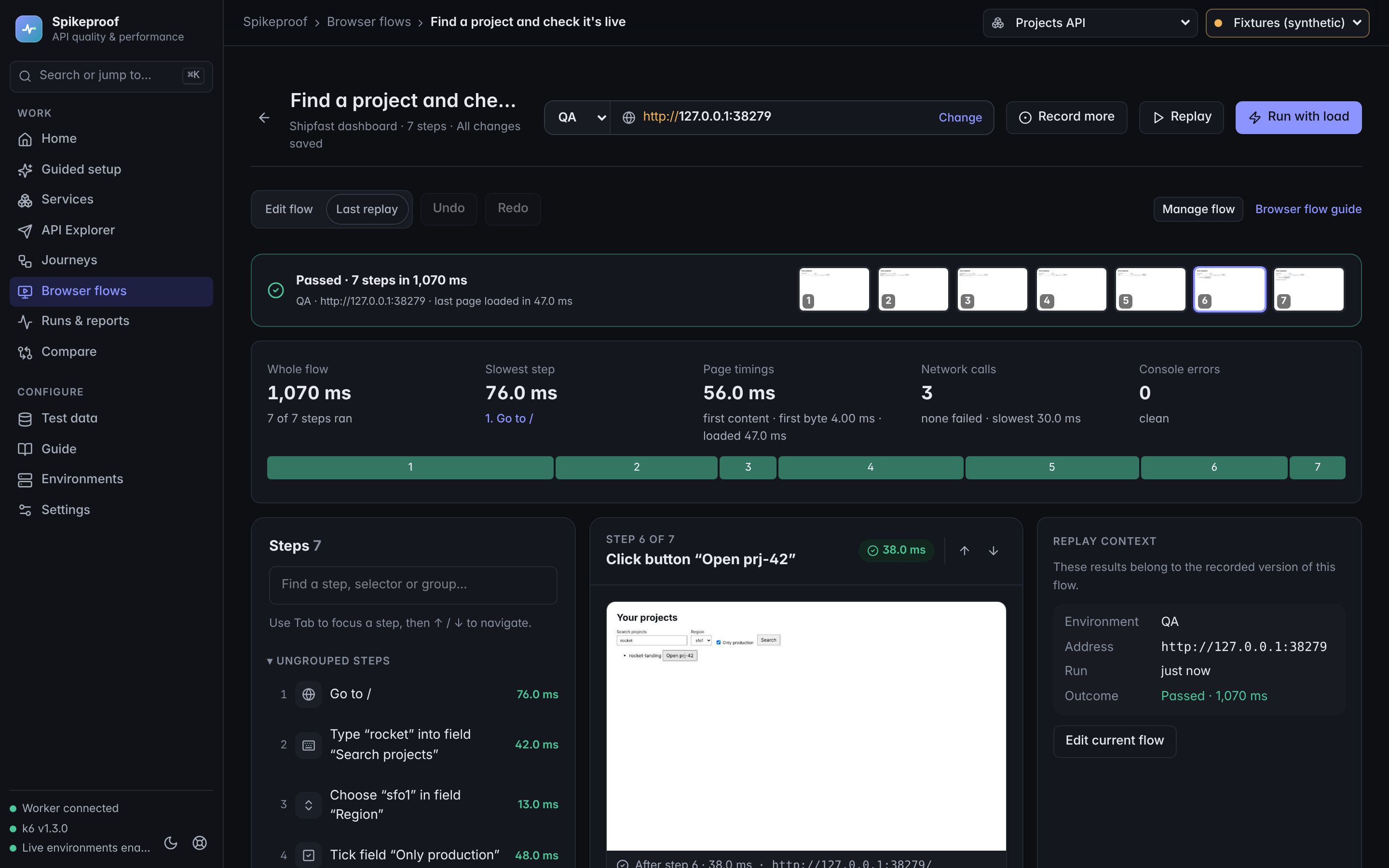
Record browser interactions as editable steps, then replay with a screenshot, timings and the API calls behind every step.
Each recorded step keeps backup locators. When the page changes, replay falls back, tells you which step healed and suggests a steadier locator.
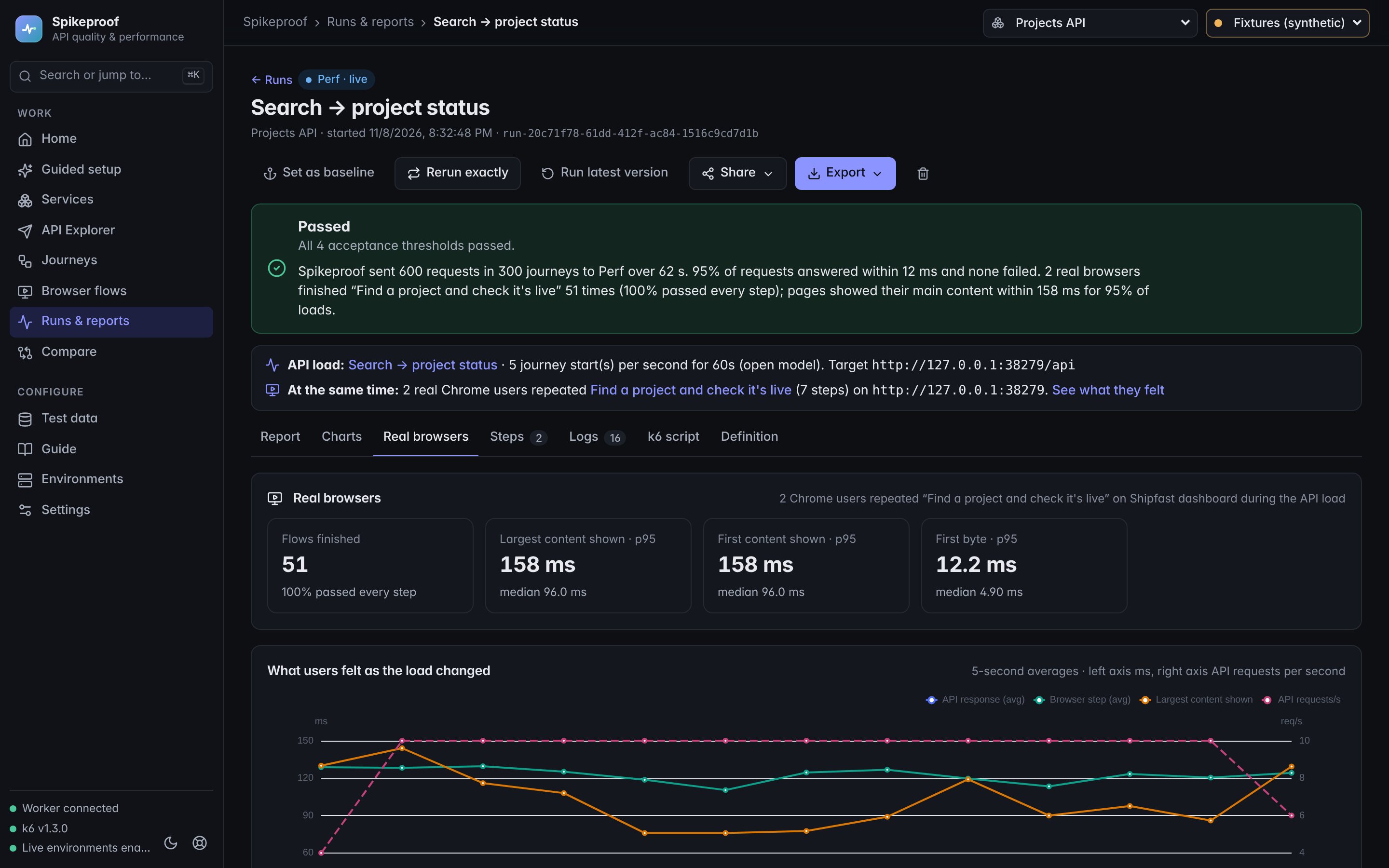
Real k6 load on your API while real browsers repeat a user flow. See page times and Web Vitals on the same timeline as API latency.
Plain-language results (“95% of requests answered within 230 ms”), baselines, comparisons, and exports to Markdown, HTML, JSON and CSV.
Export a journey and run it headless on a build agent: the same k6 engine and rules as the app, with JUnit results and clear exit codes.
Portable packages carry journeys, services and environments with a digest, never credentials. Imports show what changed and never silently overwrite.
The same test, in your pipeline
Export a journey from the app as a portable package, commit it next to your code, and let every build answer “did this get slower?”
- Run in CIThree steps in the app give you the test package and a complete pipeline file. No credentials in either.
- Runs on any agentGitHub Actions, Jenkins or a shell script. It installs a pinned k6 and the single-file CLI, checks everything, then runs.
- Stay inside the linesWithout an approved policy only localhost runs. Production names never do.
$ spikeproof preflight checkout.json --env perf
  ✓ Policy · ✓ Target approved · ✓ k6 · ✓ Network
$ spikeproof run checkout.json \
    --env perf --output results
  → results/junit.xml · result.json · report.md
0 | Passed | every threshold and journey check |
|---|---|---|
1 | Failed | a threshold or a check failed |
2 | Invalid | bad package or unknown environment |
3 | Blocked | target not approved, or load over its limits |
4 | Didn't run | k6 missing, timeout or runner error |

Safe by design
- Requests only go to base URLs you register, with relative paths. Spikeproof is never an open proxy.
- Execution credentials are resolved on the machine running Spikeproof. Runner logs redact credentials; review captured data before sharing reports.
- Big loads belong in perf environments; other environments are limited to small checks.
- Shared packages never contain credentials. CI reads them from its own secret store at launch.
Spikeproof on your desktop
A local-first performance testing workspace for macOS (Apple Silicon) and Windows (x64), with Node.js and k6 built in. Version 0.1.0-beta.3 is a public beta.
Built for local execution
- Services, journeys and results saved locally
- Real k6 execution and measured results
- Browser tests use installed Chrome or Edge
Free to download. The beta is unsigned, so macOS and Windows ask you to confirm the first time you open it; the download page shows how.
Download SpikeproofIs this website the testing application?
This site showcases Spikeproof. Tests execute through a local runner, not through this public website. The desktop prototype stores saved services and results in your operating system’s application data directory, separately from the application itself.